
Business Operations & Analytics
Analytics & Operations App
Track assets, customers, operations and performance in one connected web application — built for complex business operations.
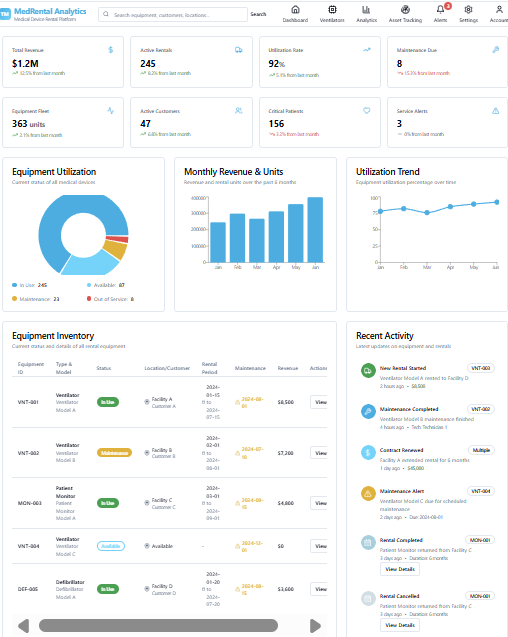
Built for medical device rental. Ready for any industry.
The example below was custom-built for a medical device rental business. The same connected approach works for equipment hire, field assets, warehouse inventory, fleet tracking and more.
Inventory & Assets
Track every device, serial number, location and status in real time — no spreadsheets required.
Rental Lifecycle
Manage reservations, deliveries, returns and billing from one connected workflow.
Maintenance & Service
Schedule repairs, log service history, and keep equipment compliant and ready.
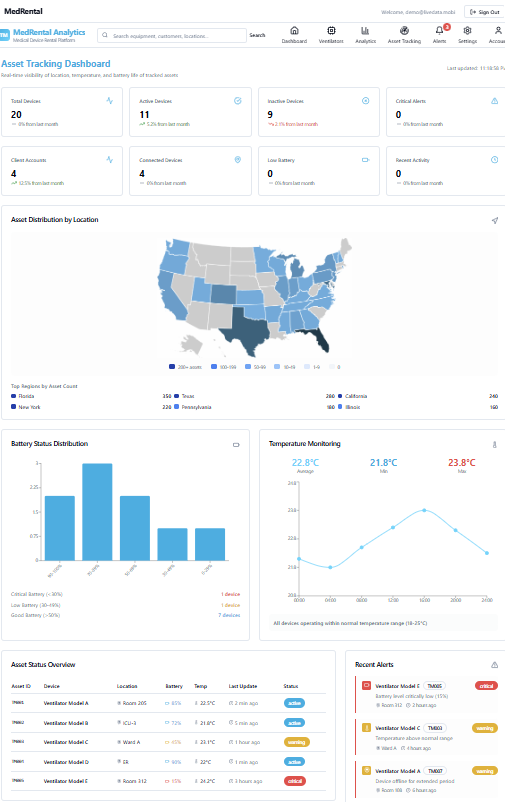
Asset Tracking
See where assets are across regions, facilities and customer sites on an interactive map.
Utilisation & Performance
Understand which assets are busy, idle or under-used so you can maximise return.
Executive Analytics
Get revenue, margin and operational KPIs in a dashboard built for leadership decisions.
Adaptable to your industry
We design the data model, workflows and dashboards around your specific equipment, customers and processes — so the system fits your business instead of forcing your business into a template.
- Medical device rentals
- Construction & industrial equipment
- IT asset management
- Fleet & vehicle tracking
- Warehouse & logistics
- Field service operations
Common questions
- What kinds of assets can this track?
- Anything with a serial number, a location and a lifecycle: rental and hire equipment, medical devices, vehicles and trailers, tools, IT hardware, returnable containers and packaging, and stocked inventory. Each asset type gets its own fields, status values and rules rather than being forced into a generic template.
- Do we need barcode scanners or special hardware?
- No. Most clients start with the camera on a phone reading barcodes or QR codes through the web app. If you already own handheld scanners or GPS trackers we integrate with those instead; if you want them later, adding them does not require rebuilding the system.
- Can it replace our spreadsheets outright?
- That is usually the point. We migrate the existing spreadsheet history so nothing is lost, then rebuild the same workflow with validation, an audit trail and multi-user access. Teams that need to keep exporting to Excel for downstream reporting still can — export stays available on every view.
- How do you handle multiple sites or depots?
- Location is a first-class concept. Assets belong to a site, transfers between sites are recorded as movements, and each site's team sees its own inventory by default while head office sees the consolidated position. Stock counts, utilisation and downtime all break down by location.
- What reporting comes out of it?
- Utilisation rate, downtime and maintenance history per asset, stock levels against reorder points, ageing of items in the field, revenue per asset for rental fleets, and exception lists such as overdue returns or unassigned units. Reports can be scheduled by email alongside the daily KPI brief.
- How long does a build take?
- A first working version usually goes live in six to ten weeks depending on the number of integrations. We deliver in stages — the core register and movements first, then reporting, then automation — so your team is using it well before the last feature is finished.
Let's build the right inventory solution for your business.
Tell us what you track, rent, service or ship. We'll shape a connected application around your exact workflow.